Navu now supports customers who use Five9 for routing and handling live chat. In addition to Microsoft Teams and Slack, this offers a new way for company agents in sales and support to connect directly with website visitors.
When a web visitor uses the Contact tab in the Navu sidebar to request a live chat, Navu will connect that visitor to a live agent via Slack, Teams, or Five9. For customers already using one of these systems, this is a convenient way to avoid more things to learn and more tools to maintain.
Compared with Slack and Teams, Five9 is more purpose-built for call center scenarios. It is highly configurable for routing requests to the appropriate agents, managing resources, tracking data, etc. All of this is configured directly in Five9. You’ll take the resulting Five9 campaign name and configure that into Navu (in your Navu Portal under Settings -> Live Agent Chat) along with your Five9 tenant/domain, making that part easy and quick to configure.
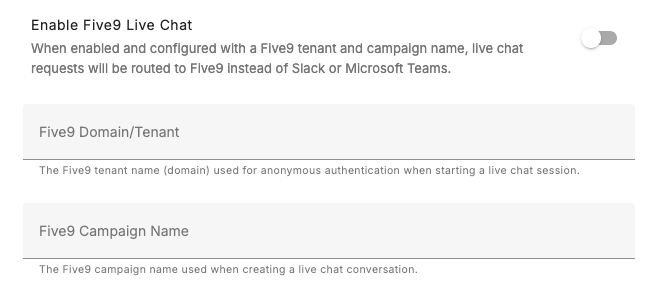
With that done, when a web visitor requests a live chat, Navu will initiate contact through the Five9 APIs and an available eligible agent will be alerted that an inbound request has been assigned to them. They accept the chat and exchange messages from within their Five9 app.
In addition, all Five9 conversation transcripts are capture in the visitor record on the Navu Tracking page.