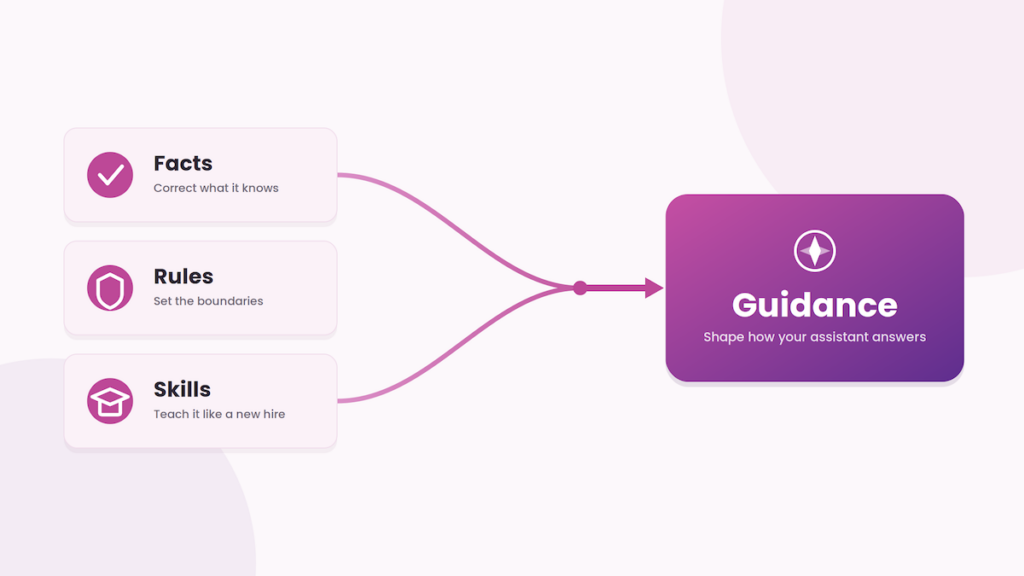
We’ve got two releases to share this time, 4.15 and 4.16, so we’ve rolled them into one update. The big one is Guidance, a simple new way to shape how your assistant answers. You’ll also find a clearer picture of the conversations happening on your site, plus a little more control over privacy for your visitors. Let’s dig in.
Shape how your assistant answers with Guidance
Guidance enhances the previous ‘Skills’ functionality, giving you three tools for adjusting your assistant’s behavior: Facts, Rules, and Skills. Each one maps to a different kind of adjustment, and Navu works out when each applies, so you can focus on describing what you want.
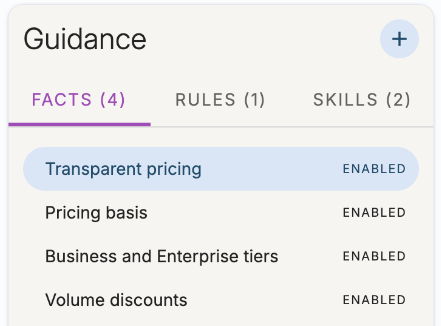
Facts: Correct what the assistant knows
Use a Fact when the assistant would otherwise answer from outdated or inconsistent information somewhere on your site, like an old blog post or a spec that has since changed. A Fact sets the record straight. For example, you might state your current warranty length so the assistant stops quoting an older one.
Rules: Set the boundaries
Use a Rule to make the assistant adopt or avoid a specific behavior it might otherwise fall into on its own. Pricing and competitor questions are common cases. A Rule might tell the assistant not to discuss pricing and to point visitors to your contact page instead.
Skills: Teach it like a new hire
Skills remain the all-purpose way to teach your assistant, the same way you would coach a new team member who talks to customers. A Skill might describe how to walk a visitor through finding the right product.
What has changed is how Skills work. You no longer have to spell out exactly when a Skill applies. Navu figures out applicability for you, and the assistant can draw on several Skills at once. Write each Skill as if you are teaching an employee, and it works.
Built-in Skills
Navu now ships with built-in skills, so you get useful guided behaviors without writing them yourself. These include capturing a visitor’s contact details and routing them to the right person on your team, which helps turn more conversations into contacts.
Analytics and visibility
You now get a clearer, richer view of how visitors engage with your assistant and what it does for your business.
Measure Navu’s impact
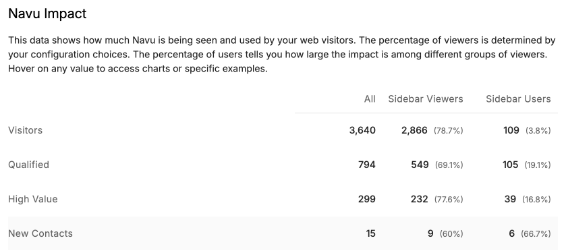
A new Navu Impact report shows how many visitors see and use Navu across your key visitor groups, from everyone who lands on your site, to those who open the sidebar, to those who actively chat. You can see how that engagement maps to qualified visitors, high-value visitors, and new contacts, so the assistant’s contribution is easy to read at a glance.
More question-and-answer detail
Each question and answer now carries more context, including troubleshooting information, which Guidance was applied, and which source grounded the answer. That makes it easier to understand how your assistant responded and where to refine it.
More visitor context
Visitor records now include consent status along with CRM information and fields, so you can connect conversations to the rest of your customer data and see each visitor’s consent at a glance.
Notifications for visitor requests
To give you better visibility into what visitors are asking for, Navu can now notify your portal admins about specific requests that come up in conversations. These alerts help you act on a follow-up when it makes sense, or spot an opportunity to add Guidance so Navu handles that kind of conversation on its own next time.
Privacy: finer-grained consent control
We have updated what Navu stores in the browser’s local storage so that visitors to your site get finer-grained control over which Navu features they consent to. Navu’s privacy posture is unchanged: it still uses only first-party cookies, stored in the visitor’s own browser. The difference is that storage is now organized around Navu’s two primary services, AI Chat and Visitor Analytics, so a visitor can consent to each independently. Navu integrates with many leading consent management platforms so it honors those choices automatically.
For existing customers, we recommend two quick actions to keep your setup current. First, confirm that your consent management platform (CMP) is identified correctly in your Navu portal, under Settings → Tracking; select your CMP from the list, or choose Auto if it is not listed. Second, add the four cookies described in our consent management platform guide to the correct categories in your CMP.