With the Navu HubSpot Integration enabled, a property, “last AI conversation at”, will be added to the HubSpot Contact record. If this property is not visible in the HubSpot contact record you will need to reconnect the HubSpot integration in Navu. Go to Settings > Integrations > HubSpot and click Reconnect.
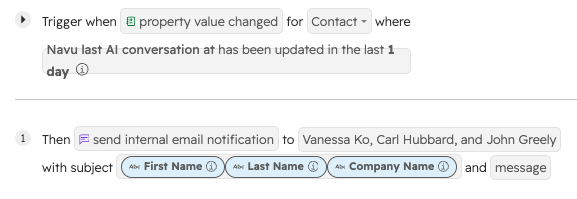
This property can be used to trigger a HubSpot workflow. The most common application is to trigger an email notification when a HubSpot contact has a conversation with the Navu AI Chat. Below is an example of how that notification might be configured in HubSpot. The exact steps to configure this notification will depend on the HubSpot license.